 Omnirelio
A soccer scoreboard with a match clock, run by remote
Goals and the match clock on your phone, big enough for the touchline. Start the clock at kick-off and add each goal from the bench with a small Bluetooth remote, without touching the screen.
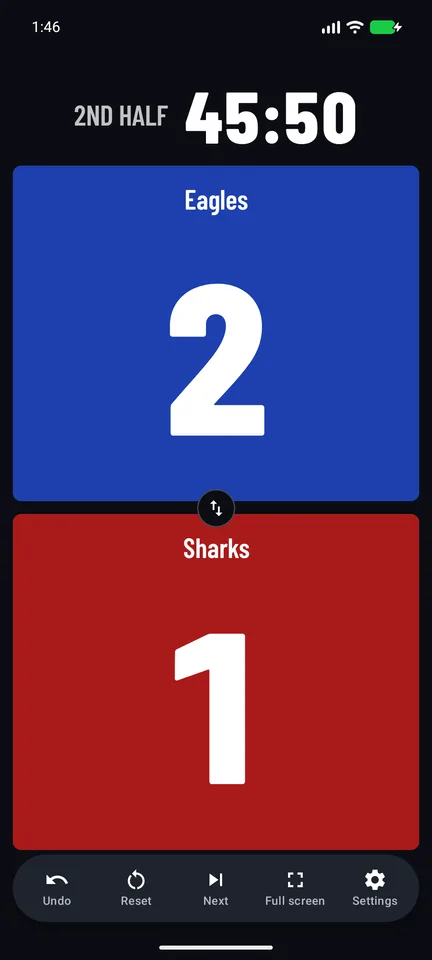

Soccer's clock, filled in
Pick Soccer and the board knows the format. Shorter halves for youth games or 5-a-side? Change any of it.
- Halves
- 2 × 45 minutes
- Match clock
- Counts up, 0 to 90: the second half starts at 45:00
- Half-time
- 15 minutes, counted down
- Extra time
- 15-minute periods, when you need them
- Goals
- One press each; Undo takes one back
- Futsal
- Its own preset: 2 × 20, timeouts and team fouls
How a match goes
-
Kick off
One press starts the clock. It keeps counting even if the app is closed, and it is still there after a phone restart.
-
Add the goals
A press adds a goal to its team. Scored by mistake? Undo takes it back.
-
Half-time
Next ends the half: the score is kept and the break counts down to the second half.
Soccer questions
Does it show stoppage time?
Yes. At 45:00 and 90:00 the match clock holds, and the added time counts beside it, such as +2:13, until you end the half.
Can parents on the sideline see it?
Turn the phone sideways and tap Full screen: the two scores fill it. Or connect a TV or monitor, and the board shows there while the phone keeps the controls.
Which remote do I need?
Two buttons are enough: a goal for each team, with Undo and the clock on long presses. See which remote to get.
Your phone is the scoreboard
Scoremote is coming to Google Play soon, free. Want to hear when it's out? Email us and we'll let you know.