 Omnirelio
Which remote for your phone scoreboard?
Scoremote works with almost any small Bluetooth remote sold for Android, from a $5 selfie button up. More buttons let the remote run more of the game. Here is what each kind can do, and which one fits your sport.
Five kinds that work
Holding a button counts as a second button, so every remote does twice what its buttons suggest.
- Selfie button
- The camera shutter remote. One team per button, or one team on a press and the other on a long press, with Undo held on the second.
- Ring remote
- Worn on a finger, sold for scrolling short videos. Both teams, Undo and the clock under one thumb. Its arrows arrive as swipes, which need Android 10 or newer.
- Media remote
- Play, next and volume buttons. Room for the clock, timeouts and fouls, so the remote runs a whole basketball or hockey game.
- Page turner
- Pedals made for sheet music. Score with your feet while your hands hold a clipboard or a whistle.
- Presenter
- The slide clicker. The longest range, for big halls. Many use a small USB receiver instead of Bluetooth: plug it into the phone, through a USB-C adapter if needed.
- Two remotes
- Every remote's buttons are told apart, so each team's scorer can hold their own. Two selfie buttons often cost less than one bigger remote.
Prices are typical and vary by model and country.
Which one for your sport
| What the remote needs to do | Enough | |
|---|---|---|
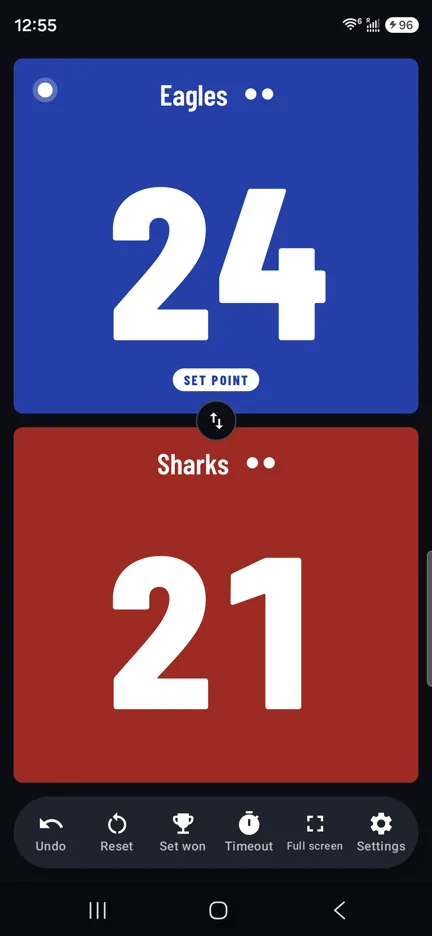
| Volleyball, pickleball, table tennis, badminton | A point for each team, and Undo. Sets, serve and set point follow by themselves. | A selfie button with 2 buttons |
| Soccer, rugby, handball | A goal for each team, Undo, and starting the clock for each half. | A selfie button, or a ring remote |
| Basketball | +1, +2, +3, the clock, the shot clock reset, timeouts and fouls. | A media remote, or two ring remotes |
| Ice hockey, futsal, water polo | Goals, the clock, and a penalty timer for each team. | A ring or media remote |
Anything the remote doesn't do is a tap away on the phone.
Set up in a minute
-
Pair it
Turn the remote on and pair it in Android's Bluetooth settings, like headphones.
-
Press each button once
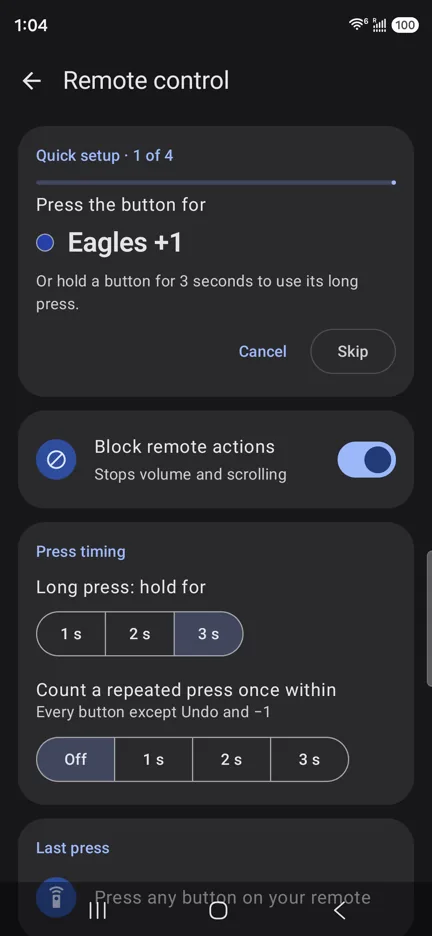
Quick setup asks for Team A +1, Team B +1 and Undo, one at a time. Press the button you want for each.
-
Play
While Scoremote is open, the remote only does what you gave it: no volume changes, no scrolling.
Remote questions
How far away can I stand?
Bluetooth usually reaches about 10 m (30 ft): from the bench to the scorer's table on most courts. A presenter with a USB receiver reaches further.
A press sometimes counts twice. Why?
Far from the phone, a press can arrive a second late. Set Press timing ▸ Count a repeated press once within to 1 or 2 seconds, and a repeat that quick counts once. Undo is never held back.
Does it work with an iPhone?
Not yet: Scoremote is an Android app, for Android 8.0 or newer.
Will the remote change my phone's volume?
Not while Scoremote is open: Block remote actions is on by default, so a saved remote does only what you gave it. Other keyboards and mice keep working.
Your phone is the scoreboard
Scoremote is coming to Google Play soon, free. Want to hear when it's out? Email us and we'll let you know.